Experimental room
Terserah
For when you can’t decide where to eat.
Open Terserah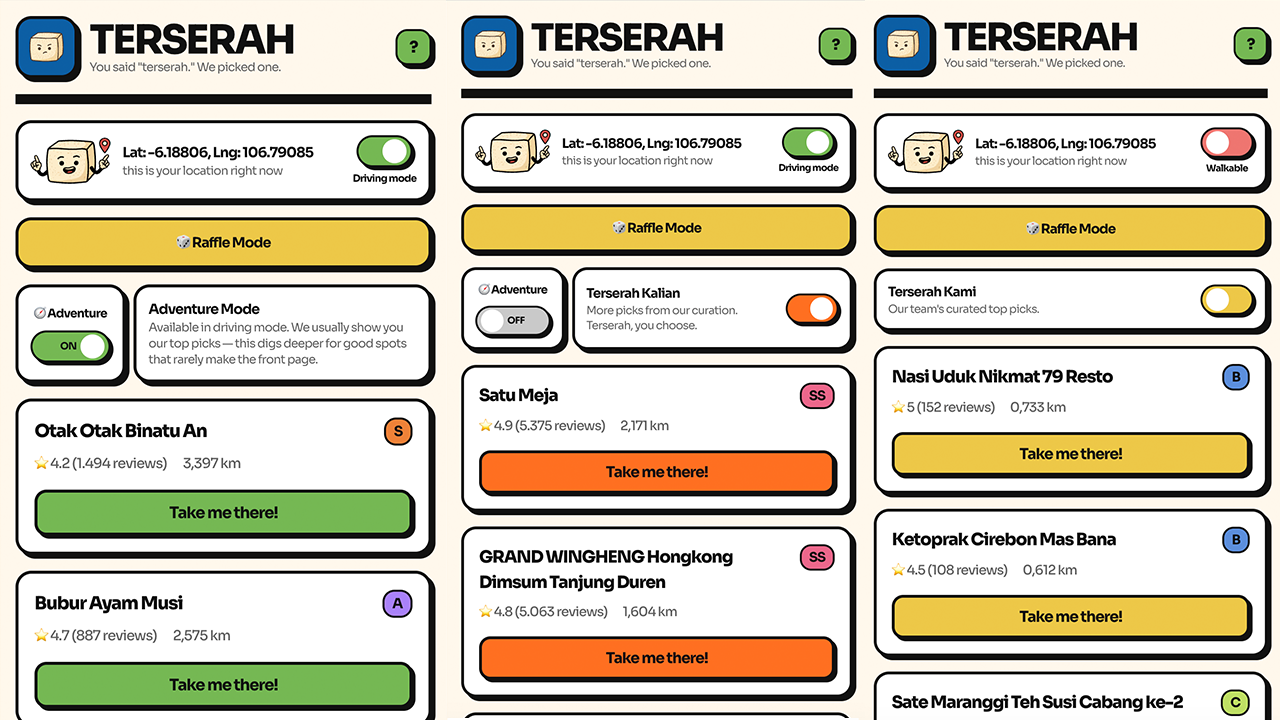
A little help with where to eat.
Why it exists.
Choosing where to eat can take longer than it should. Terserah started as a hobby project to make that decision easier.
It uses location and a curated restaurant list to narrow things down. The current focus is Jakarta; coverage varies by area.
Terserah Kami
A shortlist of up to five nearby restaurants.
Terserah Kalian
Browse a wider selection of up to thirty places.
Raffle Mode
Let the app pick a place from your results.
Adventure Mode
Discover more places within a 5 km radius.
Add Terserah to your home screen.
Keep it nearby for the next time you’re deciding where to eat. Start by opening Terserah on your phone, then follow the steps below.
iPhone · Safari
- Open Terserah in Safari.
- Tap Share (the square with an upward arrow). Depending on your layout, you may need to open the More menu first.
- Scroll down and tap Add to Home Screen. If it’s missing, use Edit Actions to add it.
- If Open as Web App appears, leave it on. Tap Add.
Android · Chrome
- Open Terserah in Chrome.
- Tap the three-dot menu, then Add to home screen.
- Choose Install if offered, or Create shortcut, then follow the confirmation prompts.
Adding it is optional—you can also use Terserah in your browser. If you opened it inside Instagram or another app, switch to Safari or Chrome first. Menu labels may vary by device and browser version.